Everything the Foundations track built — hashing, keys, the Diffie–Hellman exchange — comes together in one protocol you use thousands of times a day: TLS (Transport Layer Security), the "S" in HTTPS. When your browser shows a padlock, TLS is what put it there.
What TLS guarantees
A raw internet connection is like shouting across a crowded room — anyone can listen, and anyone can pretend to be the person you're talking to. TLS wraps that connection to provide three things at once:
- Confidentiality — the data is encrypted, so eavesdroppers see only noise.
- Integrity — tampering is detected, so nobody can quietly alter what's sent.
- Authentication — you're really talking to
yourbank.com, not an impostor.
The first two you already understand (encryption and hashing/MACs). The third — authentication — is the part that makes TLS more than "just encryption", and it is where most of the cleverness lives.
The handshake
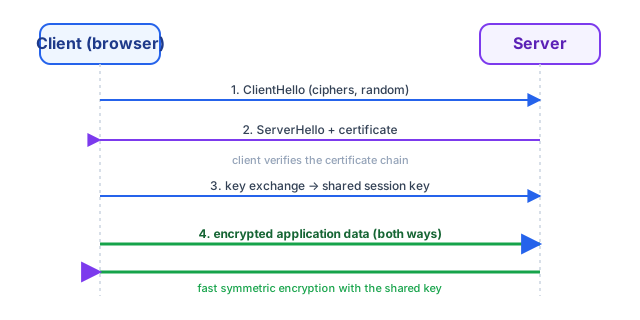
Before any real data flows, client and server run a handshake (see the diagram):
- ClientHello — the browser says hello and lists the cipher suites it supports, plus some random data.
- ServerHello + certificate — the server replies and sends its certificate,
which contains its public key and its identity (
yourbank.com). - Key agreement — using the certificate's key and a Diffie–Hellman-style exchange (the widget below is exactly this step), both sides derive the same session key without ever sending it.
- Encrypted data — from here on, everything is encrypted with fast symmetric crypto using that session key. Asymmetric crypto set up the key; symmetric crypto carries the traffic — the best of both, as the keys lesson foreshadowed.
Try the key-exchange widget below to see step 3 in miniature: two parties agreeing on a shared secret over a channel an eavesdropper can read.
Certificates and trust
Here is the subtle part. Anyone can generate a key pair and claim to be
yourbank.com. What stops them? A certificate is that claim signed by a
Certificate Authority (CA) — an organisation your browser already trusts. The
browser checks the signature against its built-in list of CAs; if the certificate
for yourbank.com isn't validly signed by a trusted CA, you get the scary warning
page. This chain of trust — you trust the CA, the CA vouches for the site — is what
turns encryption into authenticated encryption, and it's the backbone of trust on
the web.
With a secure channel established, the next question is who's on the other end of it — proving you are who you say you are. That's authentication, next.